AT-SAVER
...is a simple but VERY specialised utility to overcome the problem that Tracktion 1.x doesn't support MIDI aftertouch (AT) data,
by converting said data to and from another kind of controller data.
I hope my taking the trouble to release it to the public will mean it's obsolete tomorrow with the release of Tracktion 2... :)
AT-saver is a small Synthedit VST plug that uses dehaupt's clever MIDI Munger module, and nothing else.
Instead of putting a switch on the interface allowing you to select its mode of operation, thus inviting you
to configure it improperly, I have instead opted to make two different versions -- trusting that no-one will attempt
to use a breath controller, a foot-controller AND aftertouch on the same instrument at the same time!
Installation
You will need:
- AT-Saver-Breath.dll and/or AT-Saver-Foot.dll. Put one or both DLL's in Tracktions plug-in folder. If you never intend to use breath-controller data in the synths where
you need aftertouch control, you just need AT-Saver-Breath. Likewise, if the foot-controller is unimportant to you,
you only need AT-Saver-Foot.
- A virtual MIDI cable or patchbay. Because we need to re-route some MIDI in Tracktion, you need a tool to create some virtual MIDI ports.
I recommend MAPLE Virtual MIDI Cable.
(And in that list were the three needed download links, in case you didn't notice!)
Tracktion Set-up
Well, it may seem a little complicated, but it really isn't. You'll just end up with what's shown on the picture below:
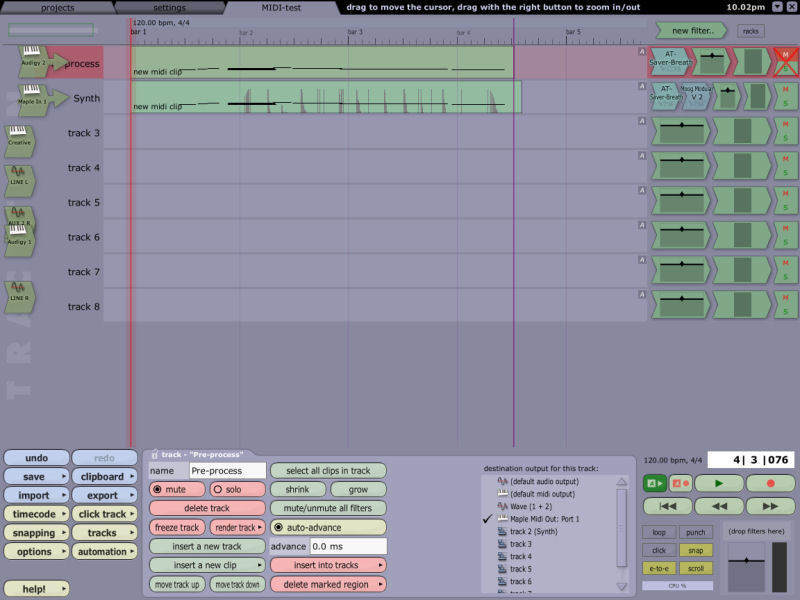
- Make sure that the AT-Saver plug(s) are visible in Tracktion.
- In the Settings/MIDI Devices tab, enable one virtual MIDI out and the corresponding MIDI in. (In the case of MAPLE,
"Maple Midi Out: Port 1" and "Maple Midi In: Port 1" will do nicely.)
- Now to set up the tracks needed: First, we will need one special "MIDI pre-processing" track that allows AT-saver to convert
aftertouch data to another kind of controller data on the fly, before it reaches the actual recording track and instrument.
- Set the (aftertouch-capable) MIDI controller's MIDI port as the input.
- Now, this MIDI port should really be set to action: "end-to-end from this device, but don't actually record".
However, at least my system records MIDI data on the track regardless, so instead, you might as well set the action
to "replace extisting clips with newly recorded clips" to minimize garbage. Nothing recorded on this track will
actually be used anyway.
- As the one and only filter on this track, insert either AT-Saver-Breath or AT-Saver-Foot.
- Set the track's output to "Maple Midi Out: Port 1" (or whatever virtual port you enabled before).
- Mute the track.
- And, you may as well minimize it out of sight, cause you really don't need to bother with it ever again. (If you're
not a compulsory neat-freak, and wish to erase all MIDI clips recorded there from time to time.)
- Now set up the track and instrument to be recorded exactly as you normally would, but:
- Set the input to "Maple Midi In: Port 1" (or corresponding).
- Just before the instrument, insert another instance of the same AT-Saver plug as used on the pre-process track above.
- That' it! Record, and enjoy. Using AT-Saver-Breath, the aftertouch data is saved in the track as Breath Controller data (CC 2),
with AT-Saver-Foot, as Foot Controller data (CC 4). Edit just like you would any other controller data.
Bugs?
Hardly possible there could be anything I have any control over. It's SynthEdit :)
One strange thing is that using the Maple Virtual Midi Cable, I get a "Foot Pedal Off" at the very end of a recorded clip.
I swear, it's not AT-Saver -- i deleted it to try without, and the pedal message still gets inserted.
Oh well. Can't do much harm!